Tuesday, February 28, 2012

Data Types

1.    Create a new database in Access. Call it “Data types”.

2.    Search for the phrase “field data types available in access” on Google. You should be able to obtain information on 9 data types used in access

3.    Create a record for each of the data types – you will need four fields, namely “Data Type”, “Typical Use”, “Size” and “Example”.

4.    Enter the data in the database.

5.    Post about the data types you have investigated.


Sunday, February 19, 2012

Social Issues Related To Databases

Group Name: The Frauds
Topic: Credit Card Fraud
Questions:
  1. Provide a definition of your topic. -ANGELA
  2. How are databases involved in this topic? -ANGELA
  3. Describe the type of data stored about individuals in relation to this topic. -NAVNEET
  4. Describe some of the ways in which this data can be misused. -KHAWAB
  5. What are the ethical responsibilities of those maintaining the database? -KHAWAB
  6. What are the legal responsibilities of those maintaining the database? -NAVNEET

    Tuesday, February 14, 2012

    Common Used Databases

    There are many commonly used databases that are around us everyday such as:

    • Library
    • Phones
    • Contacts
    • Spreadsheets
    • Information Records

    Contacts Database


    This is a contacts database, there are 8 fields and 11 records.

    Querying A Database

    Question 1)
    Suppliers- We need a contact name, contact number of companies in USA.
    This is the query made to get all the companies in USA. I had to select contact name, phone, and country to make the query work the right way. In criteria I had to type USA to get all the contact names, numbers of companies in USA.
    These are the results that came from the query made.


    Question 2) We need product names that cost more than $20.
    This is the query made for all the products to show which cost more than $20. In order to see the right results, I had to type >20 in criteria for the unit price coloumn.
    These are the results for the query made.


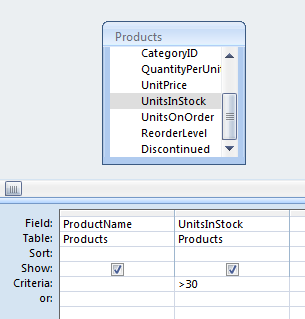
    Question 3) We need products with more than 30 items in stock

    The query made in this was that all the products that have more than 30 items in stock. In the criteria row for units in stock, I wrote >30 to get the write results for my query.


    These were all the results that came up for products that have more than 30 in stock.

    Tuesday, February 7, 2012

    Database Definitions

    Field: A field is a single piece of information and also fields are the smallest units of information you can access.
    Record: A record is one complete set of fields.  Records are composed of fields, each of which contains one item of information.

    File:  A file is a collection of records. A collection of data or information that has a name, called the file name.

    Query: A request for information from a database. A query is when you ask a question to the database. Query search for records that match the field criteria.
    Database: A collection of information organized in such a way that a computer program can quickly select desired pieces of data

    Report: A formatted and organized presentation of data.

    DBMS: A collection of programs that enables you to store, modify, and extract information from a database.

    Data Dictionary: A data dictionary contains a list of all files in the database, the number of records in each file, and the names and types of each field.

    Data Types:
    Classification of a particular type of information.
    alphanumeric text eg, abc....123.....?#/......
    numeric 0-9 , eg 1234