A problem that I encountered when I had to put all the QR codes together was that I only had access to a PDF version of the whole school events sheet. Due to that I was unable to insert the QR codes on the PDF file. What I did to overcome this was that I created a new word document and re-created the same layout of the school event sheet on word. Therefore, this allowed me to insert the QR code with ease and the problem was solved.
Sunday, October 28, 2012

Wednesday, October 24, 2012
Real World Project Post 1
Today, I completed creating all the QR codes for the important school events.
In order for me to create the QR codes for memo dates I used this website
http://www.qrstuff.com/
The important school events that I made QR codes for, are:

In order for me to create the QR codes for memo dates I used this website
http://www.qrstuff.com/
The important school events that I made QR codes for, are:
- Staff Development Day (Pupil Free Day)
- 7-11 Award Ceremony
- Year Assemblies and Liturgy Picnic Day
- Parent/Teacher Interviews
- 7-9 Activities

Saturday, October 20, 2012
Friday, October 19, 2012
Sunday, October 14, 2012
Term 4 Project
Members in the group and role of each person:
Kajal - creating QR codes for business cards
Khawab - creating eBook about QR codes and Augmented Reality
Garima - creating eBook about QR codes and Augmented Reality
Celine - creating eBook about QR codes and Augmented Reality
Navneet - creating QR codes for important school events (memos)
Project Outline:

Kajal - creating QR codes for business cards
Khawab - creating eBook about QR codes and Augmented Reality
Garima - creating eBook about QR codes and Augmented Reality
Celine - creating eBook about QR codes and Augmented Reality
Navneet - creating QR codes for important school events (memos)
Project Outline:
- Create an eBook about QR codes and Augmented Reality.
- Create QR codes for reminders of important school events
- Also create QR codes for business cards of the main school contacts. eg: Ms Grigson, Ms Kazzi, Mr Hackney.
Gantt Chart:

Wednesday, September 5, 2012
Term 3, Task 3: Software Development
Today, I asked Sir, if I could use my last year's game that I made on scratch. He said I could use it since, I had two variables, which were a score and lives. However I am going to add another variable on my game, where have you have to enter you name in at the beginning of the game.
Basic Drum Kit
Step 1: Pictures are added first:
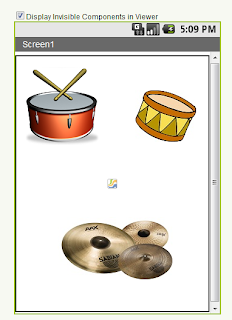
Step 2: Add sound components

Step 3: Add scripts blocks editor, in order for the app to work

Step 4: Test the app on the emulator

Step 2: Add sound components
Step 3: Add scripts blocks editor, in order for the app to work
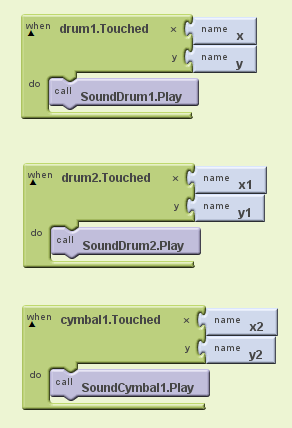
Step 4: Test the app on the emulator
Subscribe to:
Posts (Atom)