Today, I asked Sir, if I could use my last year's game that I made on scratch. He said I could use it since, I had two variables, which were a score and lives. However I am going to add another variable on my game, where have you have to enter you name in at the beginning of the game.
Wednesday, September 5, 2012

Basic Drum Kit
Step 1: Pictures are added first:
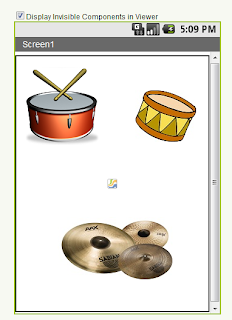
Step 2: Add sound components

Step 3: Add scripts blocks editor, in order for the app to work

Step 4: Test the app on the emulator

Step 2: Add sound components
Step 3: Add scripts blocks editor, in order for the app to work
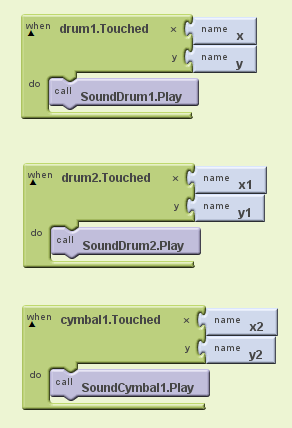
Step 4: Test the app on the emulator
Tuesday, July 31, 2012
Augmented Reality
1. Define augmented reality (AR). Augmented Reality is a type of virtual reality that aims to duplicate the world's environment in a computer. An augmented reality system generates a composite view for the user that is the combination of the real scene viewed by the user and a virtual scene generated by the computer that augments the scene with additional information.
2. Provide some examples of how augmented reality might be used.
-Picking furniture
-Finding Places/ Find out out street names
-Interactive Prints
-Update on social network
-Happenings around you
3. Traditionally a user would use text entry to search for information in say Maps or a search engine. How does AR offer a different alternative?
An Android smartphone is an ideal tool for travelers because all sort of tools can be pack on this portable device–we have maps, navigation apps, local business finder apps, and many more. A compass is also one of the essential tools for travelers and explorers. This tool can be used for pointing to the right direction. The 3D Compass + (AR Compass) app is your augmented reality compass app on your mobile phone.The app primarily works as a compass on your mobile phone. Using the phone’s camera, the app displays the actual image of where you are going with an augmented compass on top of it. You can also change the compass into a Rose Compass, Marine Compass, and Artificial Vertical Compass. The app also utilizes your phone’s GPS and displays the map on the screen, making your phone an excellent navigation tool. The address of your location is also displayed in the app.
4. How might the following people make use of AR;
● A mechanic: Use it as blueprints for projects.
● An interior decorator: It can be used to demonstrate what a certain furniture would appear like in a room and what an ideas can look like when the room is completed.
● A student: A student can use augmented reality when they on a school excursion, so as they are exploring they can find out extra information.
Magic 8-ball
Add all the components:

Edit the blocks to make the sound and random outcomes to work:

(optional) you can adjust it so when the phone is shaken, the 8 ball works.
From the Sensors palette, drag over an AccelerometerSensor sensor component. Notice that it automatically drops down to the “Non-visible components” area of the Viewer window.
The final app should look like this on the emulator:


Edit the blocks to make the sound and random outcomes to work:

(optional) you can adjust it so when the phone is shaken, the 8 ball works.
From the Sensors palette, drag over an AccelerometerSensor sensor component. Notice that it automatically drops down to the “Non-visible components” area of the Viewer window.
The final app should look like this on the emulator:

Sunday, July 29, 2012
Hello Purr App
Steps:

2) Delete "Text for Button1" listed under the Text property using the Backspace key. Your Designer should look like this:


These are the buttons that have to be added in order to play the sound.

The Final thing should look like this on the emulator:

1) From the Basic palette, drag and drop the Button component to Screen1 (#1). In the Properties pane, under Image, click on the text "none..." and click "Add…" (#2). Select the the kitty.png file you downloaded earlier (#3).

2) Delete "Text for Button1" listed under the Text property using the Backspace key. Your Designer should look like this:

3) From the Basic palette, drag and drop the Label component to the Viewer (#1), placing it below the picture of the kitty. It will appear under your list of components as Label1.

4) Step 4. Under Palette, click on the Media drawer and drag out a Sound component and place it in the Viewer (#1). Wherever you drop it, it will appear in the area at the bottom of the Viewer marked Non-visible components. Under the Media pane, Click Add... (#2) Upload the meow.mp3 file to this project (#3). Under the Properties pane, click None... to change the Sound1 component's Source to meow.mp3 (#4).

These are the buttons that have to be added in order to play the sound.

The Final thing should look like this on the emulator:

Tuesday, July 24, 2012
PSEUDOCODE COMMANDS
Examples:
else.....
This example is a selection because you are making a choice.
2. Do While....EndDo
This example is a repetition.
3. Repeat.....Until.......
This example is a repeition.
Keywords:
- Initialize (set to an initial value)
- Input (get a value)
- Print (output to hard copy)
- You can have Pretest repetition.
- You can also have Post Test repetition.
PSEUDOCODE EXAMPLE:
"Filling a bath with 80L"
Begin
Initialize Volume=0
Turn on tap
Repeat
Wait 1 minute
Until Volume=80
Turn off tap
End.
PSEUDOCODE
- Type of English
- Uses common words
- Informal structure -(no set rules)
- The purpose is trying to describe an algorithm in text that resembles code.
Subscribe to:
Posts (Atom)